Claude for Small Business (2027): Plans, Costs, Use Cases and Setup
Claude for small business, checked Nov 28, 2026: which plan to buy (Pro, Team Standard and Premium, Enterprise as the ceiling, API), real monthly costs for 1, 5, 15 and 50 people, the free Claude for Small Business plugin and its workflows, setup steps, data training terms, integrations and limits.

Short answer: for most small businesses, Claude means one of two plans. A solo owner needs Pro, at $17 a month billed annually or $20 month to month. Any business with two or more people should use the Team plan: $20 per Standard seat billed annually or $25 monthly, plus a $100 Premium seat ($125 monthly) for each heavy user. At list price, a 5-person team with one power user pays about $180 a month. A 15-person team pays about $540, and a 50-person team about $1,640. Anthropic’s free Claude for Small Business plugin adds 43 ready-made workflows, such as the month-end close and lead follow-up, on any paid plan. Enterprise, with a 20-seat minimum, is only for firms that need SCIM, audit logs or a HIPAA agreement.
All prices below are US list prices before tax, checked on Anthropic’s own pages on November 28, 2026.
Key takeaways
- The plugin is free; the plan is what you pay for. Anthropic’s own advice: “Pro for one person, Team for a business with more than one.”
- Annual billing is the only real discount. Every plan prices a Pro-sized unit of usage at $20 a month; annual billing brings it to $16 on Team.
- Team includes up to $500 a month in pooled API credits for building your own automations.
- Team data is excluded from training by default. On Free and Pro, training is a per-account setting.
- Healthcare is the exception. HIPAA readiness is Enterprise-only (20 seats minimum) or API, so a 5-person clinic can’t put patient data into Team.
What “Claude for Small Business” actually is
Since May 2026, “Claude for business” has a literal answer. Anthropic launched Claude for Small Business on May 13, 2026. Anthropic describes it as “a package of connectors and ready-to-run workflows” that you switch on inside Claude Cowork, the desktop workspace where Claude works with your files and connected apps. At launch it had 15 workflows and 15 skills built around Intuit QuickBooks, PayPal, HubSpot, Canva, Docusign, Google Workspace and Microsoft 365.
On September 15, 2026, it grew to 43 workflows and 37 partner connectors, adding Shopify, Salesforce, Xero, Gusto, Square, Stripe and Zapier, among others. Anthropic says it had been installed more than 900,000 times by then (its own figure).
Three things matter for an owner:
- It is not a plan. The plugin costs nothing extra. It needs Pro, Max, Ultra, Team or Enterprise; the Free plan can’t run it.
- It starts in approval mode. Every workflow drafts and stages its work, and nothing “sends, posts, or pays” until you approve it. Once you trust a workflow, you can let it run on a schedule.
- It stops short of filing. Anthropic’s small business page says payroll is “set up for you to submit” and that Claude “doesn’t file anything for you.” You still own payroll submissions, tax filings and anything signed.
Anthropic says most owners using it “run businesses under ten people, many solo.”
Which Claude plan fits a small business
Here is the full ladder from Anthropic’s pricing page, reduced to the rows a small business decides on.
| Plan | Price (US, ex-tax) | Who it’s for | Usage | Business features | Your data and training |
|---|---|---|---|---|---|
| Free | $0 | Trying Claude | Limited, resets every 5 hours and weekly | Chat, web search, files, 1 custom connector; no Claude Code, no Opus | Training is a personal setting |
| Pro | $17/mo annual ($200 up front) or $20 monthly | Solo owner | 1x (the baseline) | Claude Code, Cowork, Projects, Research, Claude in Chrome, Microsoft 365 | Training is a personal setting |
| Max | $100/mo, monthly only | Solo owner who works with Claude all day | 5x Pro | + $100/mo API credits, priority access | Training is a personal setting |
| Ultra | $200/mo, monthly only | Very heavy solo use | 10x Pro weekly, no 5-hour limit (verified accounts) | + $200/mo API credits | Training is a personal setting |
| Team Standard | $20/seat/mo annual, $25 monthly | 2 to 150 people | 1.25x Pro per session, per person | Central billing, SSO, connector admin controls, enterprise search, Slack, usage analytics | Not used for training by default |
| Team Premium | $100/seat/mo annual, $125 monthly | Power users on a Team plan | 6.25x Pro per session (5x Standard) | As Standard; mix seat types freely | Not used for training by default |
| Enterprise (ceiling) | $20/seat/mo annual + all usage at API rates; 20-seat minimum | Firms needing compliance controls | Pay per token, no included allowance | SCIM, audit logs, custom roles, custom retention, HIPAA-ready | Not used for training by default |
| API (pay as you go) | Per token, e.g. Haiku 5.5 $0.10/$0.50 per million tokens in/out | Building your own automations | Metered | Batch processing at 50% off; HIPAA readiness available | Not used for training by default |
Two rules settle most choices.
- One person: Pro, then Max. If you hit the 5-hour limit most days, Max gives five times the usage for $100. Ultra suits only hours-long agentic or coding sessions.
- Two or more people: Team. It is the first plan with organization-wide no-training by default, central billing, SSO and shared projects. Anthropic’s Team plan help article is explicit that “each seat is for one named individual,” so sharing a single Pro login among several staff is not an option.
What this means: most small businesses never need to look past Team. Buy Standard seats for everyone and add a Premium seat only for the people who hit limits, usually whoever writes code, builds spreadsheets or runs long research. Usage limits are per person, so one heavy user doesn’t eat into anyone else’s allowance.
Enterprise looks similar at $20 a seat, but it includes no usage, so every token is billed on top, with at least 20 seats. Our Claude Team vs Enterprise comparison covers the controls and the migration in detail.
What Claude really costs: 1, 5, 15 and 50-person teams
Pricing pages show a per-seat number; owners need a monthly bill. The table turns list prices into bills for four team sizes, assuming one Premium seat for roughly every five people.
| Team size | Plan and seat mix | Monthly bill, annual billing | Monthly bill, monthly billing | Per person (annual) | Per year (annual) | Free API credits each month |
|---|---|---|---|---|---|---|
| 1 | Pro | $16.67 | $20 | $16.67 | $200 | None |
| 5 | Team: 4 Standard + 1 Premium | $180 | $225 | $36 | $2,160 | $180 |
| 15 | Team: 12 Standard + 3 Premium | $540 | $675 | $36 | $6,480 | $500 (capped) |
| 50 | Team: 42 Standard + 8 Premium | $1,640 | $2,050 | $32.80 | $19,680 | $500 (capped) |
| 50 | Enterprise self-serve (comparison) | ~$3,230 (seats $1,000 + usage ~$2,230) | Annual only | ~$64.60 | ~$38,760 | Not eligible |
Assumptions: US list prices, before tax. The Enterprise usage line assumes 42 chat-only users at $15 a month in API-rate usage each (our estimate; a plausible range is $5–30) and 8 Claude Code users at $200 a month each. The $200 is the midpoint of Anthropic’s published Claude Code average of $150–250 per developer per month. The all-Standard version of each team is cheaper: $100, $300 and $1,000 a month at 5, 15 and 50 seats.
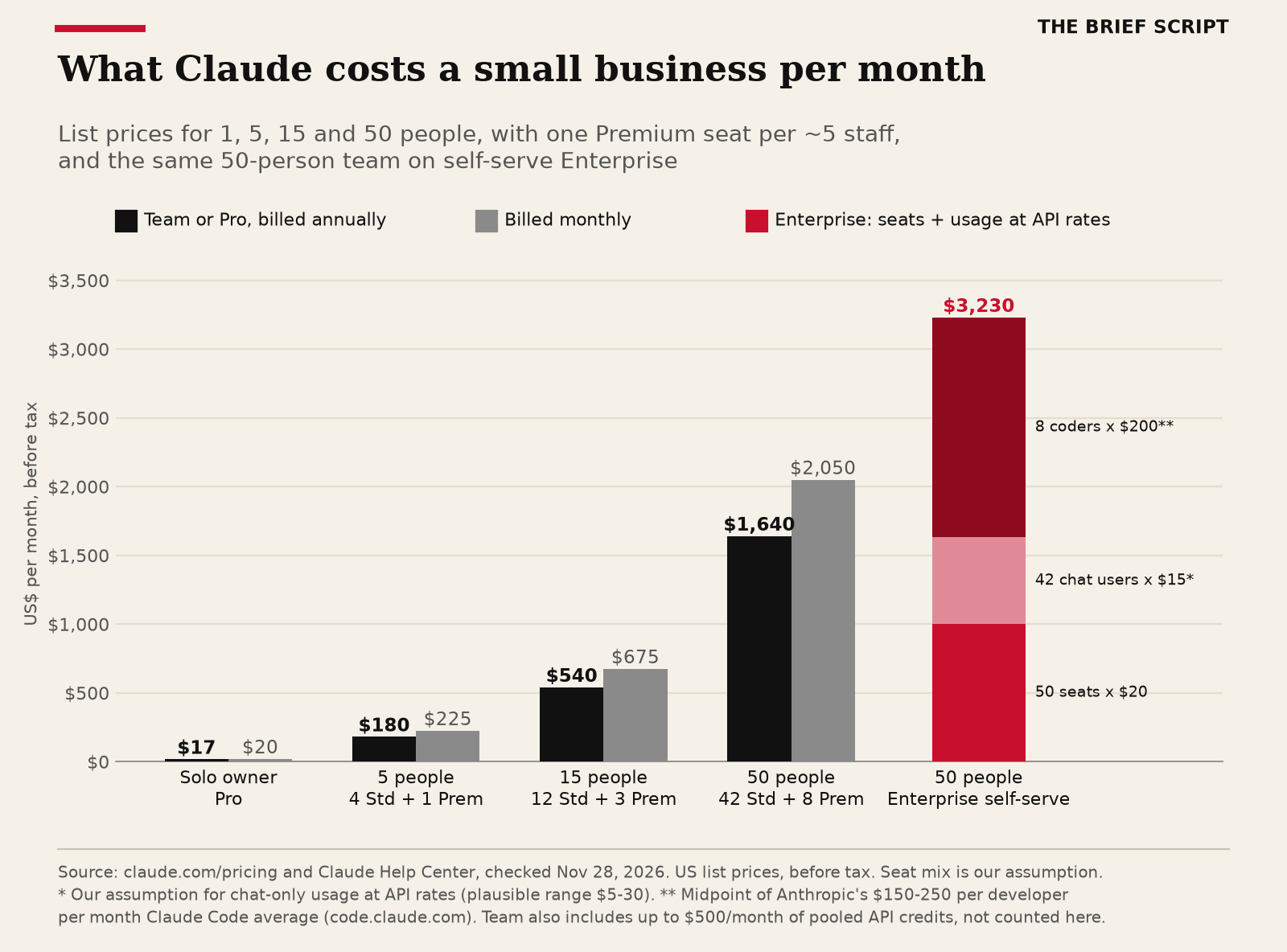
The headline: Team costs about $33–36 per person per month at small-business sizes once you include a few Premium seats, and about $20 per person if everyone is on Standard. Below 150 people, nothing in Anthropic’s lineup is cheaper per person for a team that uses Claude daily.
A few billing rules change the real cost:
- Annual billing saves 20% on Team seats ($20 vs $25). New seats are charged pro rata at once, but removing someone gives no credit or refund; the seat waits for the next hire.
- Team is card-only. Credit, debit or prepaid cards; no ACH or invoicing.
- Usage credits are the overflow valve. Owners can prepay credits, billed at API rates under a monthly spend limit, so staff keep working past their limit. They expire after 12 months and are non-refundable.
- Pooled API credits are a free extra. Team plans get $20 per Standard seat and $100 per Premium seat in monthly API credits, pooled and capped at $500. They cover the Claude API, Managed Agents and the Agent SDK, but not Claude Code or extra usage in the Claude apps. Unused credits expire every billing cycle. Under Anthropic’s credit rules, you claim them by linking a Claude Console organization once you have been on the plan for seven days.
- Nonprofits pay far less. Verified nonprofits get Team at $8 per user per month, or $3 in low- and middle-income countries.
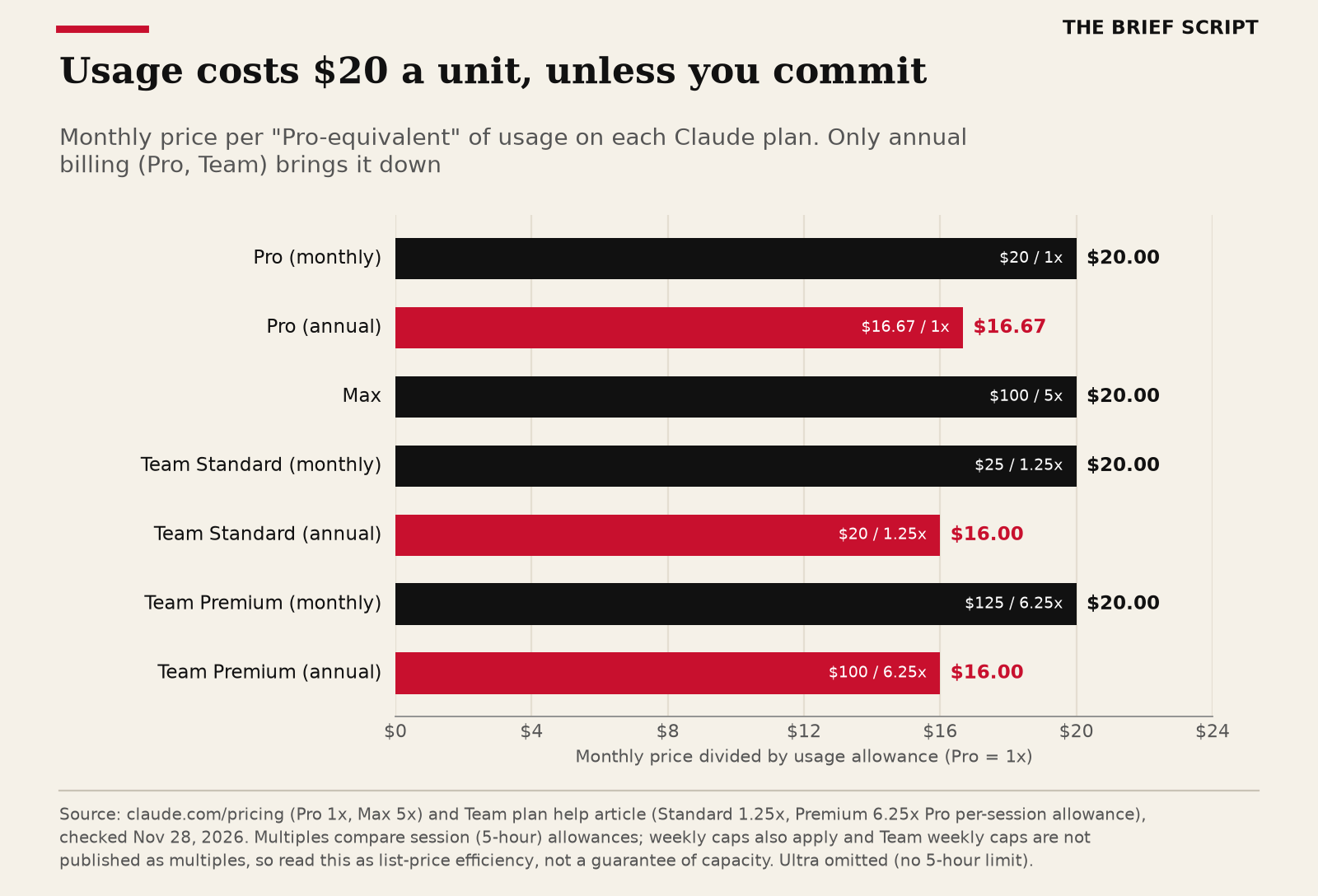
What this means: don’t pick a plan by hunting for the “best value” seat. Anthropic prices usage almost identically everywhere, at $20 for each Pro-sized unit on monthly billing. The only levers are annual billing and putting each person on the smallest seat that covers their work. One caveat: the multiples compare 5-hour session allowances, and weekly caps also apply.
When Enterprise starts to make sense
At 50 people, Enterprise in our example costs about twice as much as Team, because it bills all usage at API rates on top of the $20 seat. It makes sense when you need something Team doesn’t have. That means automatic user provisioning and removal through your identity provider (SCIM), audit logs and a Compliance API, custom data retention, domain capture, IP allowlisting, or a HIPAA-ready setup. The other trigger is size: Team stops at 150 seats. Self-serve Enterprise needs at least 20 seats and is billed annually only.
Paying for the API instead
Some automations need no seats at all. Tagging and routing 3,000 support emails a month (about 2,000 tokens in and 400 out each) costs roughly $1.20 a month on Haiku 5.5, $24 on Sonnet 5.5 or $48 on Opus 5.5 at list API rates, by our arithmetic. Even the Sonnet version fits inside a 5-person Team plan’s free API credits. The catch is that someone has to build and maintain it, which is where Claude Code, included in every Pro and Team seat, comes in.
Claude use cases for small business, by function
Claude handles the generic jobs (drafting, summarizing, research, spreadsheets). The plugin adds named workflows that pull from tools you already pay for. Command names are from Anthropic’s plugin install guide.
Finance and the back office
/monday-brief: cash, last week’s sales, pipeline, overdue invoices and “the one thing that most needs you” on one page, scheduled into Slack or email./close-month: reconciles your books against Stripe, Shopify or PayPal settlements, flags mismatches and writes a plain-English P&L for your accountant./plan-payroll: checks you’ll have the cash, chases overdue invoices and prepares the run for you to submit./pay-the-billsand/tax-prep: stage bill payments and gather paperwork for quarterly taxes or 1099s.
Sales
/speed-to-lead: answers after-hours inquiries with real calendar openings and logs the lead in your CRM./grow-pipelineand/call-list: find prospects like your best customers and say who to call today.- “Turn this into a proposal”: a voice memo, site photos or an RFP become a priced, branded proposal.
Marketing
/marketing-monday: what’s working, what customers say and what competitors changed.- Content strategy plans posts around what’s actually selling, with Canva generating the assets for approval.
Operations, HR and legal
/restock: works out reorders from Shopify, Square or NetSuite data and drafts purchase orders.- Hiring screener and job-post builder: rank applicants, schedule interviews, write the ad and a scoring rubric.
- Contract review: a plain-English summary, red flags and a redline. A first read, not legal advice.
Building your own tools
Claude Code, included in every Pro and Team seat, is how non-developers build small internal tools such as a quote calculator or a stock alert. If your business has developers, see our enterprise AI coding tools index for how Claude Code compares with other coding assistants.
Anthropic’s case studies give a sense of the upside. A Las Vegas café group credits Claude in part for in-store margins rising to 22%. A baby-gear retailer tied $60,000 in sales to a lead-capture tool it built in four days. One owner says Claude found about $180,000 in shipping overcharges. These are vendor-published testimonials, not audited results, so use them as ideas rather than benchmarks.
What this means: start with one workflow tied to a number you already watch, such as overdue invoices, response time to leads or hours spent on month-end. Run it in approval mode for a few weeks before letting it run on a schedule. If you use several AI tools, our AI tools for startups guide covers how to keep the stack small.
Setting up Claude for your team
A Team plan takes an afternoon to set up properly. The order matters, because some settings can’t easily be changed later.
- Decide who owns it. There is one Primary Owner per organization, using a paid seat. Pick the owner or office manager, not a contractor. Team roles are fixed (User, Admin, Owner, Primary Owner); custom roles are Enterprise-only.
- Create the Team plan, or upgrade in place. Upgrading from a directly billed Pro or Max cancels it with a prorated refund, unless you tick “Keep your personal account separate.”
- Add people. Invitations are the default. With Google Workspace or Microsoft Entra, verify your domain and switch on single sign-on (SSO), which Team includes.
- Enable connectors at the organization level. On Team, an Owner adds each connector once, then each member connects their own account. Claude inherits that member’s permissions in the source app. Microsoft 365 work accounts also need consent from a Microsoft Entra Global Administrator. The Slack connector needs the Claude app installed in your Slack workspace first.
- Install the Small Business plugin on the web or desktop app, then say “set me up” or run
/smb-onboard. Without connectors, most workflows still run from a spreadsheet or forwarded email. - Set money guardrails. In Organization settings > Usage, decide on usage credits and set an organization-wide monthly spend limit.
- Claim the API credits in Organization settings > Billing by linking one Claude Console organization. You can’t change it yourself later.
- Decide on feedback sharing. Owners can turn off “Rate chats” so staff can’t send whole conversations to Anthropic as feedback.
- Write down the rules: what data may go into Claude, who approves connectors and which workflows may run unattended. Our shadow AI guide explains why staff will use personal accounts if the company account is harder to use.
Data privacy and training: what small businesses should know
The single most useful fact here is that Anthropic treats consumer and business plans differently.
- Team, Enterprise and the API are commercial products. In Anthropic’s own words, “by default, we will not use your inputs or outputs from our commercial products… to train our models.” The exception is feedback: a thumbs up or down stores the whole related conversation for up to five years and may be used for training. That’s why step 8 above matters.
- Free, Pro, Max and Ultra are consumer plans. Since Anthropic changed its consumer terms in 2025, training on these plans is controlled by a setting on each account. Chats used for training may be kept in de-identified form for up to five years, while deleted chats leave Anthropic’s back-end systems within 30 days. If a solo owner on Pro handles client data, turn the setting off and check it again after any plan change.
- Existing permissions apply. Connectors see only what the connected account can see, except custom connectors using one shared API key, which give everyone that key’s access.
- Security paperwork exists. Anthropic says its controls are audited to SOC 2 Type II. Its Trust Center is where customers request the reports.
Healthcare is the hard limit. If you are a HIPAA covered entity, such as a dental office, physiotherapy clinic or small medical practice, you need a business associate agreement before protected health information goes into any vendor’s system. Anthropic offers a HIPAA-ready configuration only on Enterprise plans, both self-serve and sales-assisted, and on the API. Self-serve Enterprise needs 20 seats. A 5-person clinic therefore has three options: keep patient data out of Claude, pay for 20 Enterprise seats, or build on the API under its HIPAA configuration. Even on Enterprise, Claude Code and Cowork in local mode need an extra configuration before they are covered.
What this means: for most small businesses, the Team plan settles the training question by default. The remaining risk is people, not policy: staff pasting client data into personal Free accounts. Make the company account the easy option and the problem largely goes away.
Integrations: connectors, MCP, Claude Code, Chrome, Excel and Slack
Claude reaches your other software through connectors, and most of them are built on the open Model Context Protocol (MCP).
| Integration | Plans | Admin step on Team |
|---|---|---|
| Directory connectors (Google Drive, Gmail, Calendar, GitHub, HubSpot, QuickBooks, etc.) | All plans; the plugin’s workflows need a paid plan | Owner enables each one; members connect their own accounts |
| Custom connectors (remote MCP) | All plans; Free is limited to one | Only Owners or Primary Owners can add them |
| Microsoft 365 (Outlook, SharePoint, OneDrive, Teams) | All plans; Claude for Microsoft 365 and Outlook add-ins on Pro and higher | Owner enables, plus Entra Global Admin consent |
| Claude Code (terminal, desktop) | Pro and higher, including every Team seat | Shares each member’s seat allowance |
| Claude in Chrome | Paid plans only | None on Team |
| Slack connector and Claude Tag (Claude inside Slack) | Team and Enterprise only | Install the Claude app in Slack first |
| Computer use (beta), Claude Meetings for Google Meet (beta) | Team and Enterprise, rolling out since November 2026 | Rolling out to organizations gradually |
Notes from the fine print:
- MCP reaches tools without a listed connector. Anyone can host a remote MCP server, and the plugin’s
build-connectorskill links missing tools through Zapier. Before letting a connector act, check how it signs in. Our MCP OAuth explainer covers what good authorization looks like. - Excel and the rest of Office come through Claude for Microsoft 365. The pricing page lists it on Pro and higher, not Free.
- Claude Code counts against the same allowance as chat. Anthropic’s Claude Code cost guide warns that one debugging session can use more than a day of chat. Whoever codes needs a Premium seat or usage credits.
- Slack changed this year. The old per-person Claude in Slack app has been retired. Claude in Slack now means Claude Tag, which an admin sets up for the whole workspace, on Team or Enterprise.
Limits and gotchas
- Usage limits can change. Anthropic may adjust limits “to manage capacity,” and web, desktop and Claude Code share one allowance.
- The 150-seat ceiling. Team stops at 150 seats. Past that, Enterprise is the only route, and moving from Team to Enterprise can’t be reversed.
- No refunds when people leave. Removing a Team member during the billing period doesn’t reduce the bill until renewal.
- Credits expire. Monthly API credits expire at the end of each cycle with no rollover. Purchased usage credits expire after 12 months.
- Connector depth depends on your plan with the other vendor. Anthropic’s guide warns that generating designs or staging sends “may need a higher tier” in the partner tool.
- Region and tax. Prices vary by region; tax-exempt organizations claim exemption through support after subscribing.
- Documentation lags. Anthropic’s Team help article still says “200k context window,” while the pricing page says up to 1M tokens depending on the model. We follow the pricing page.
When ChatGPT or Copilot fits better
Claude isn’t the default answer for every small business. On price, ChatGPT Business matches Claude Team almost exactly: $20 a seat billed annually or $25 monthly, Premium at $100 or $125, and 2 to 200 users. OpenAI is also running a promotion that doubles included usage for businesses that sign up by November 30 (through December 31). If you already run on Microsoft 365, the Microsoft 365 Copilot Business add-on costs $21 per user per month paid yearly. Microsoft currently lists it at $18 under a promotion, and it works inside the Word, Excel and Outlook files you already have.
Our rule of thumb: Claude for long documents, careful writing and back-office workflows across QuickBooks, HubSpot and Shopify; Copilot when everything lives in Microsoft 365; ChatGPT when your team already uses it. We tested Claude and ChatGPT head to head in ChatGPT vs Claude for business, and Copilot against ChatGPT in Microsoft Copilot vs ChatGPT for business.
Decision checklist
- Just you? Start with Pro at $17 a month billed annually. Move to Max only if you hit limits most days.
- Two to 150 people? Choose Team with Standard seats, plus Premium for anyone who codes or runs long analyses.
- Planning to stay at least a year? Pay annually and save 20% on Team seats.
- Handling patient data? Don’t use Team for it. Go to Enterprise (20+ seats) or the API with a BAA.
- Need SCIM, audit logs or custom retention? That’s Enterprise. Read our Team vs Enterprise comparison first.
- Your apps on the plugin’s 37-connector list? Install Claude for Small Business and run one workflow in approval mode.
- Set guardrails: an organization spend limit, the feedback-rating decision, and a one-page AI policy.
- Linked a Console organization? Claim the free API credits once you’ve been on Team for seven days.
FAQ
Is there a Claude plan for small business?
Not a separate plan. Claude for Small Business is a free plugin, launched May 13, 2026, that runs on any paid plan. Anthropic recommends Pro for one person and Team for businesses with more than one.
How much does Claude cost for a small business?
At US list prices: $17 to $20 a month for a solo owner on Pro. On Team, Standard seats cost $20 each billed annually ($25 monthly) and Premium seats $100 ($125). With one Premium seat per five people, that is about $180 a month for 5 people, $540 for 15 and $1,640 for 50, billed annually.
Does Anthropic train on my business’s data?
Not by default on Team, Enterprise or the API. The exception is conversations someone submits as feedback through the thumbs up/down buttons, which owners can disable. On Free, Pro, Max and Ultra, training is a setting each user controls.
Can a small medical or dental practice use Claude with patient data?
Only under a HIPAA-ready setup. Anthropic offers that on Enterprise plans (self-serve needs 20 seats) and on the API, not on Pro or Team. Smaller practices should keep protected health information out of Claude or build on the API under a BAA.
Can my staff share one Claude Pro account?
No. Pro is a personal plan, and on Team each seat is for one named individual. Team starts at two seats and adds central billing, SSO and data excluded from training by default.
Sources
- Anthropic, “Claude for Small Business launches new workflows, integrations, and training programs,” Sep 15, 2026: https://claude.com/blog/claude-for-small-business-launches-new-workflows-integrations-and-training-programs
- Claude for Small Business solution page and FAQ: https://claude.com/solutions/small-business
- Small Business plugin page: https://claude.com/plugins/small-business
- How is my Team plan bill calculated?: https://support.claude.com/en/articles/9267289-how-is-my-team-plan-bill-calculated
- Team plan billing FAQs: https://support.claude.com/en/articles/12997503-team-plan-billing-faqs
- Manage usage credits for Team and seat-based Enterprise plans: https://support.claude.com/en/articles/12005970-manage-usage-credits-for-team-and-seat-based-enterprise-plans
- Roles and permissions: https://support.claude.com/en/articles/9267276-roles-and-permissions
- Get started with custom connectors using remote MCP: https://support.claude.com/en/articles/11175166-get-started-with-custom-connectors-using-remote-mcp
- Slack integration (Claude Tag and Slack connector): https://claude.com/docs/connectors/slack
- HIPAA-ready Enterprise plans: https://support.claude.com/en/articles/13296973-hipaa-ready-enterprise-plans
- How long do you store my data? (consumer plans): https://privacy.claude.com/en/articles/10023548-how-long-do-you-store-my-data
- Claude for Nonprofits pricing: https://claude.com/solutions/nonprofits
- Claude release notes (computer use, Claude Meetings, API credits): https://support.claude.com/en/articles/12138966-release-notes