Best Agentic Browsers (2027): 10 AI Browsers Compared for Work
What an agentic browser is, and 10 AI browsers compared on price, platforms, models, data handling and admin controls: Perplexity Comet, Dia, Opera Neon, Edge, Chrome, Brave, Genspark, BrowserOS, Sigma and Strawberry. Plus the security risks and how to choose for work. Checked November 2026.

In short: An agentic browser is a web browser with a built-in AI agent that can click, type, fill forms and finish multi-step tasks inside your logged-in sites. As of November 14, 2026, the strongest picks are Perplexity Comet for most people, Microsoft Edge or Google Chrome for companies already on Microsoft 365 or Google Workspace, Dia for knowledge work, and BrowserOS for open-source control. Every one of them is exposed to prompt injection.
The category moved fast in 2026: OpenAI shut down ChatGPT Atlas, Microsoft folded Copilot Mode into Edge, and Opera made Neon free to download. Most “best AI browser” lists predate those changes. This one is dated and sourced from each vendor’s pricing, help and admin pages, read November 13-14, 2026. It is a desk comparison, not a hands-on test.
What is an agentic browser?
An agentic browser is a browser in which an AI model does more than answer questions about a page. It can act: open tabs, navigate, click buttons, type into fields, compare products across sites and complete a task such as booking a table or filling an expense form, usually inside the accounts you are already signed into.
It differs from two things it is often confused with:
- An AI browser with a sidebar. Summarizing a page or chatting about tabs is assistance; the agent is the part that acts. Several browsers below give the sidebar away and charge for the agent.
- A cloud browser for developers. Headless browsers in a data center are automation infrastructure. An agentic browser runs on your computer with your cookies and sessions, which is what makes it useful and risky.
The underlying idea is the same as any AI agent: a model that plans and executes steps toward a goal with some autonomy. If you want the broader distinction, our explainer on AI agents vs agentic AI covers it.
What happened to ChatGPT Atlas?
OpenAI’s ChatGPT Atlas was the highest-profile agentic browser of 2025, and it no longer exists. OpenAI’s ChatGPT release notes say Atlas was scheduled to stop working on August 9, 2026, with its browser-based agent moving into ChatGPT and Codex. Browser data did not transfer automatically. We covered the shutdown, which came 292 days after Atlas launched on macOS, in our report on OpenAI ending Atlas.
OpenAI now offers a browser inside the ChatGPT desktop app and a ChatGPT extension for Chrome. Neither is a standalone browser, so Atlas is not in our lineup. The lesson for buyers: a browser is a long-term commitment, and a vendor’s roadmap is not a durable product.
Fellou is also excluded: its website still offers downloads, but Arkose Labs wrote in September 2026 that it was “no longer available,” and we could not resolve the conflict.
The 10 best agentic browsers compared (November 2026)
Checked on official vendor pages, November 13-14, 2026. “Price to use the agent” is the cheapest monthly plan that unlocks the vendor’s own browser agent, in US dollars.
| Browser | Status (Nov 14, 2026) | Price to use the agent | Platforms | What the agent does | Models | Data handling | Admin controls |
|---|---|---|---|---|---|---|---|
| Perplexity Comet | Generally available | Free browser; agent from Perplexity Pro ($20/mo); Enterprise Pro $40/seat | Mac, Windows, iOS, Android | Navigates, clicks, fills forms across tabs | Perplexity routing to OpenAI, Anthropic and other models | Enterprise data never used for training; consumers can opt out | Yes: MDM, agent permissions, domain rules, audit logs |
| Dia | Available; AI paid for new Mac users | $10/mo (Better Answers); $100/mo (Better Days) | Mac, Windows | Assistant-first: works across tabs and connected apps | Partner models (not named) | Zero-data-retention deals with AI partners | Yes: MDM, AI blocked by domain, DLP logs, SSO |
| Opera Neon | Available | Free with your own agent; Neon agents $19.90/mo | Mac, Windows | Neon Do acts on pages; scheduled tasks; MCP and CLI for outside agents | OpenAI, Anthropic, Google | Not documented for business | None documented |
| Microsoft Edge | Consumer: US only; business: limited preview | Microsoft 365 Premium ($19.99/mo, US) or Microsoft 365 Copilot licence | Windows, Mac (agent on desktop) | Browse with Copilot clicks and types in your Edge window | Microsoft Copilot | Enterprise data protection; passwords and payments blocked | Yes: on/off policy, site allow and block lists |
| Google Chrome | US and India, paid Google AI plans | Google AI Pro ($19.99/mo); AI Plus and Ultra also qualify | Windows, Mac, Chromebook Plus; Android (US) | Auto browse runs multi-step tasks in Chrome tabs | Gemini | Workspace prompts not used for training | Yes: off by default for managed users, URL allow and block policies |
| Brave | Early testing behind a flag | Free (opt-in flag) | Windows, Mac, Linux | Leo AI browsing runs tasks in an isolated profile | Task model plus a second “alignment checker” model | No logs, no retention, no training | Limited |
| Genspark AI Browser | Available | Free credits to a lifetime cap; Plus $24.99/mo | Mac (macOS 15+), Windows | Autopilot mode, Super Agent on every page, MCP store | Cloud models; on-device open-weight models | Not documented for business | Team and Enterprise plans; SCIM on Enterprise |
| BrowserOS | Available, open source, pre-1.0 | Free (AGPL-3.0); you pay your model provider | Mac, Windows, Linux | Built-in agent; BrowserOS neo lets Claude Code, Codex and other MCP agents drive it | Bring your own keys or local models | Sessions and history stay on your machine | None documented |
| Sigma | Available | Free (limited); Plus $10/mo; unlimited agent on Pro $75/mo | Mac, Windows, iPhone | Agent navigates, clicks and types; local Private Mode | Your API key, or local models | Local “Eclipse” model option | None documented |
| Strawberry | 1.0 since Oct 26, 2026 | Free (500 credits/mo); Intern $20/mo | Mac, Windows | “Companions” run research, outreach and recurring tasks in logged-in sites | Multiple providers; model choice on paid plans | “No training on your content”; EU chat storage | Team admin controls (not detailed) |
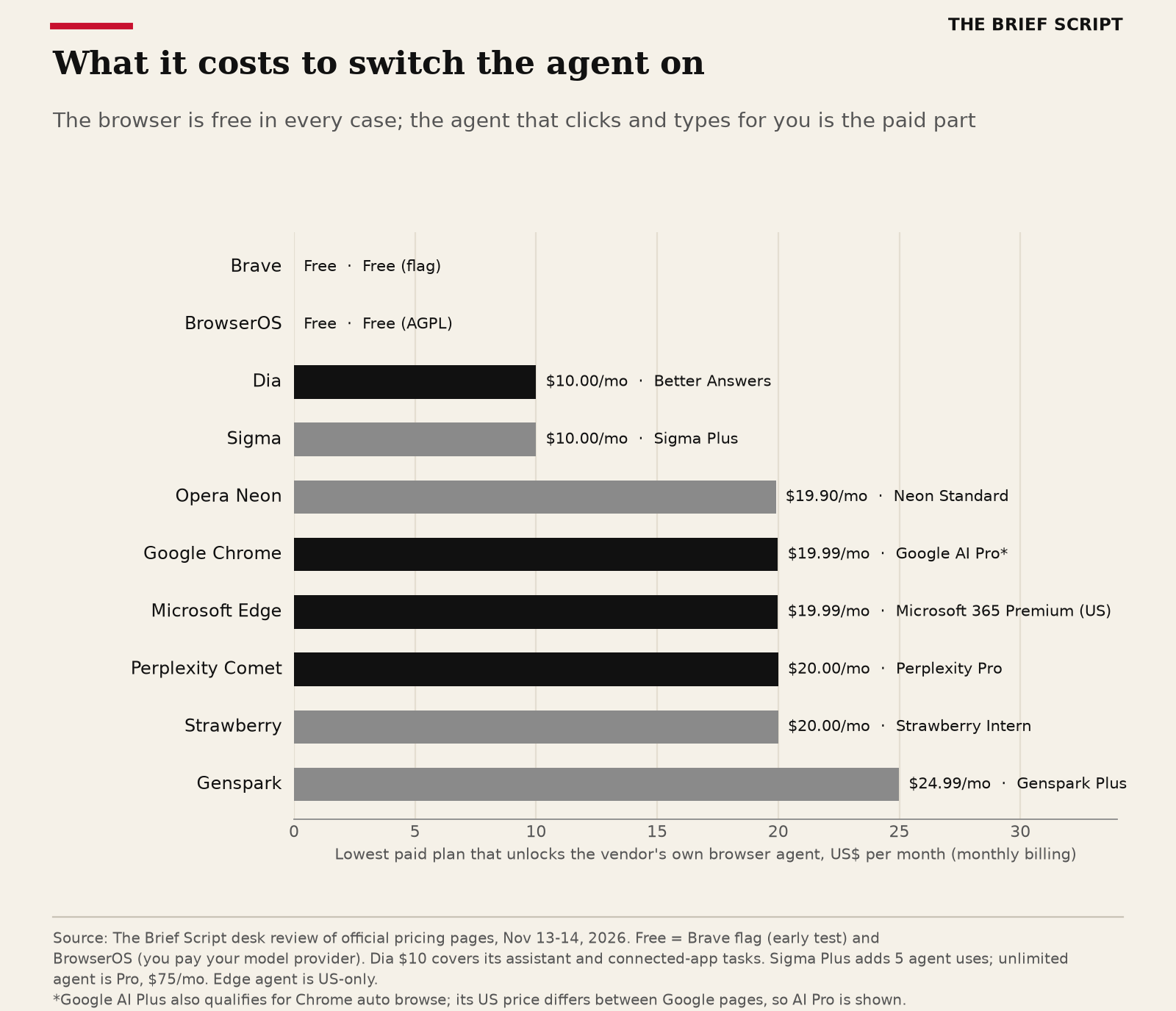
The browser is free almost everywhere; the agent is the paid part, and most vendors have landed on about $20 a month.
Perplexity Comet: best agentic browser for most people
Comet is the most complete agentic browser you can install today. It runs on Mac, Windows, iOS and Android, and the browser is free. The agent, Comet Assistant, is not: Perplexity’s plan comparison lists browser-agent queries as “No” on the free plan, monthly limits on Pro and Max, and fixed allowances of 80 a month on Enterprise Pro and 800 on Enterprise Max. Enterprise Pro starts at $40 per seat per month.
Comet Enterprise, launched in March 2026, lets admins deploy silently through MDM, apply more than 500 Chromium policies, allow answers without actions, restrict actions to approved domains and review audit logs. An opt-in CrowdStrike Falcon integration adds phishing and malware detection.
Pros: four platforms; strong research and citations; the most complete admin controls of any startup browser.
Cons: consumer agent limits are described as “average use” rather than numbers; Comet has been the most-studied target for prompt-injection research (see the security section), and Perplexity closed at least two outside reports without the fix researchers asked for.
Dia: best for knowledge work across your apps
Dia, from The Browser Company (the makers of Arc, now owned by Atlassian), is an assistant-first browser. It reads across your tabs and connected apps such as Slack and Notion to help with research, drafts and reports. It is less focused on clicking through websites for you than Comet or Neon.
Since August 17, 2026, new Mac users get a free browser with no AI after a 14-day trial. Dia’s plans page lists Better Answers at $10 a month and Better Days at $100 a month with 20 times more usage; existing users and Windows users keep their current access for now. Dia for Windows reached version 1.0 on October 6, 2026.
For IT, Dia’s work page lists a SOC 2 Type II report for 2025, MDM and server-side controls, the ability to block AI on chosen domains and file types, activity logs sent to your own S3 bucket, connected-app allowlists, output watermarking and SSO through Atlassian Guard.
Pros: cheapest paid AI tier; deep app integrations; serious admin controls; zero-data-retention agreements with its AI partners.
Cons: Mac-first pricing rollout is still in motion; the Windows build is weeks old; it does not name the models it uses.
Opera Neon: best for running your own agents
In August 2026 Opera made the Neon browser, its MCP connector and its command-line tool free, so you can point Claude, ChatGPT or another agent at your logged-in Neon session. Neon’s own agents (Neon Do for web tasks, Make for building things, deep research and scheduled tasks) need the Standard plan, which Opera’s subscription page lists at $19.90 a month with models from OpenAI, Anthropic and Google.
Pros: the most flexible option for people who already use agents; scheduled tasks; free VPN and ad blocker.
Cons: Windows and Mac only; no documented enterprise controls; month-to-month only. Letting outside agents drive a logged-in browser raises the same authorization questions we cover in our guide to MCP OAuth.
Microsoft Edge: best for Microsoft 365 organizations
Edge no longer has a separate Copilot Mode. Microsoft’s May 13, 2026 Edge update retired it and renamed the agent “Browse with Copilot,” available on Edge desktop to Microsoft 365 Premium subscribers in the US only, with usage limits. Microsoft 365 Premium costs $19.99 a month.
For businesses, it is a limited preview for Microsoft 365 Copilot licence holders, excluding the European Economic Area, and it starts from “off.” Microsoft’s policy documentation says that if no domains are on the allow list, the feature is effectively disabled. Microsoft also says the agent cannot access saved passwords or payment methods, pauses for sensitive actions, and keeps existing DLP policies in force.
Pros: the strongest default-deny model here; inherits Microsoft 365 data protection; nothing new to deploy.
Cons: consumer agent is US-only; business agent is still a preview and excluded from the EEA; Microsoft’s policy names are already changing between Edge versions.
Google Chrome: best for Google Workspace organizations
Chrome’s agent, auto browse, plans a task, shows you the plan, then works through it in Chrome tabs, pausing for confirmation before sending messages, submitting forms or paying. Google’s auto browse help page lists the requirements on desktop: 18 or older, in the US, English as the device language, and a Google AI Ultra, Pro or Plus plan on a personal account. Google’s plans page adds India, and Android users in the US got auto browse in August 2026. Google AI Pro costs $19.99 a month.
For managed users, auto browse is off by default; admins can enable it for qualifying Workspace editions and set URL allow and block lists, and Google says Workspace prompts and tab context are not used to train models.
Pros: no browser switch for the roughly 70% of web users already on Chrome (StatCounter, June 2026); layered defenses including a separate model that checks agent actions against your goal; clean Workspace admin story.
Cons: US and India only for consumers; usage caps (reported at 20 tasks a day on Pro).
Brave: best for privacy-first testing
Brave treats its agent as an experiment. Brave’s AI browsing announcement describes it as opt-in, behind a feature flag, and since May 5, 2026, available for early testing in all release channels. The agent runs in a separate, isolated browser profile, so it never touches the cookies and logins in your main profile. A second model checks whether each action matches what you asked for, and the agent is blocked from internal settings pages, non-HTTPS sites and pages flagged by Safe Browsing. Brave says it keeps no logs and never trains on your data.
Pros: the safest architecture here; free; Linux.
Cons: the isolation that makes it safe also means it cannot use your logged-in accounts; it is a test feature, not a product.
Genspark AI Browser: best for heavy automation on a budget
Genspark’s browser adds a Super Agent on every page, an Autopilot mode, an MCP tool store and on-device open-weight models. Its membership plans give free accounts 100 credits a day up to a lifetime cap, then charge $24.99 a month for Plus or $40 a seat for Team, with SCIM provisioning on Enterprise.
Pros: on-device models; broad tool connections; team plans.
Cons: credit pricing is hard to forecast; macOS 15 or later only on Mac; it did not respond to the BioShocking disclosure described below.
BrowserOS: best open-source agentic browser
BrowserOS is a Chromium fork licensed under AGPL-3.0, with more than 14,000 stars on GitHub. The classic browser has a built-in agent that uses your own API keys or local models. Its newer sibling, BrowserOS neo, is a second browser that sits next to Chrome so agents such as Claude Code, Codex or Cursor can drive your logged-in sessions over MCP. Sessions, screenshots and history stay on your machine, and every agent run can be replayed.
Pros: free; inspectable code; Linux; no vendor lock-in on models.
Cons: pre-1.0; reviewers report that local models are not strong enough for its agent mode; a reviewer noted the local MCP endpoint documents no authentication, so treat it as a power-user tool.
Sigma: best for local, private AI
Sigma, built by an Estonian company, leads with a local model called Eclipse that answers without sending prompts to the cloud. Its AI agent can navigate, click and type, but in standard mode it needs your own API key; in Private Mode it runs on local models. The free plan includes limited agent use, Plus ($10 a month) adds five more agent uses, and unlimited agent use is on Pro at $75 a month.
Pros: strong local-model option; iPhone app; low entry price.
Cons: the real agent tier is expensive; no documented business controls; no response to the BioShocking disclosure.
Strawberry: best for sales and recruiting teams
Strawberry, a Stockholm startup, left beta with version 1.0 on October 26, 2026. You build “companions” for jobs such as lead research or candidate sourcing, which can run on a schedule and be shared across a team. Strawberry says they work in sites you are signed into and ask before anything that sends or changes a record.
Strawberry’s pricing starts with 500 free credits a month, then $20, $85 and $250 a month for 6,000, 25,000 and 75,000 credits, with “no training on your content” listed on every plan. Teams get three free seats.
Pros: built around repeatable business workflows; shared companions; per-action approvals.
Cons: new and small; credit-based costs; chat data is stored in the EU, but a spokesperson told one publication that content is still sent to US model providers. We have no commercial relationship with Strawberry or any vendor here.
Best agentic browser by use case
- Best overall: Perplexity Comet, for its four platforms, agent quality and admin controls.
- Best for Microsoft 365 companies: Microsoft Edge, once browsing with Copilot leaves preview.
- Best for Google Workspace companies: Google Chrome with auto browse.
- Best for knowledge workers: Dia, if your work lives in Slack, Notion and docs more than in web forms.
- Best for people who already run agents: Opera Neon (free tier) or BrowserOS neo.
- Best open source: BrowserOS.
- Best for privacy: Brave for isolation, Sigma for local models.
- Best for repeatable team workflows: Strawberry or Genspark.
ChatGPT Atlas alternatives: if you used Atlas for its agent, Comet is the closest replacement as a standalone browser; if you want to stay with OpenAI, the ChatGPT desktop app’s browser or its Chrome extension is the official path.
Perplexity Comet alternatives: Chrome with auto browse or Edge with Copilot if you would rather not switch browsers; Opera Neon or BrowserOS if you want to choose the model; Dia if you want a cheaper assistant over agent actions.
Dia browser vs Comet: Dia is the better work assistant across apps and is cheaper at $10; Comet is the stronger agent on websites and runs on phones. Both now have real admin controls.
Agentic browser security risks
Agentic browsers combine three things security teams normally keep apart: untrusted web content, a model that follows instructions, and your authenticated sessions. The result is a new class of risk.
Prompt injection. Instructions hidden in a web page, email or image can hijack the agent mid-task. Brave’s researchers showed this against Comet in August 2025, including injections hidden in near-invisible text in screenshots. OpenAI wrote in December 2025 that prompt injection, “much like scams and social engineering on the web, is unlikely to ever be fully ‘solved.'”
Guardrails help but do not close the gap. Anthropic’s prompt-injection research found that its improved safeguards cut an adaptive attacker’s success rate against Claude in the browser from about 10.8% to 1.9% for Sonnet 4.5 and 1.4% for Opus 4.5. That is a large improvement, and still more than one success in a hundred attempts.
Credential and session abuse. In June 2026, LayerX’s “BioShocking” research tricked six agentic browsers and extensions (ChatGPT Atlas, Comet, Fellou, Genspark, Sigma and Claude for Chrome) into copying test login credentials to an attacker by framing the task as a game. Per LayerX’s disclosure, only OpenAI fixed it; Perplexity closed the report, Fellou, Genspark and Sigma did not respond, and Anthropic’s patch did not hold.
Broken web isolation. A University of Washington study of seven agentic browsers found that a successful prompt injection can let one site use the agent to read or act on another, undermining the same-origin policy that has protected browsers for decades. Browsers that gave agents fewer permissions were safer.
Shadow adoption. Employees can install a free agentic browser in minutes, the problem our shadow AI guide describes, except this tool can act. Agents that connect to tools over MCP add the risks in our MCP security guide.
How to choose an agentic browser for business
Gartner’s December 2025 advisory, Cybersecurity Must Block AI Browsers for Now, told CISOs to block all AI browsers until enterprise-ready products reach general availability. Eleven months later, a few have: Comet Enterprise is generally available, and Microsoft and Google ship admin policies for their agents, though Edge’s business agent is still in preview. That changes the question from “block or allow” to “which one, under which controls.”
- Start from your identity stack. On Microsoft 365 or Google Workspace, test the agent in the browser you already manage first.
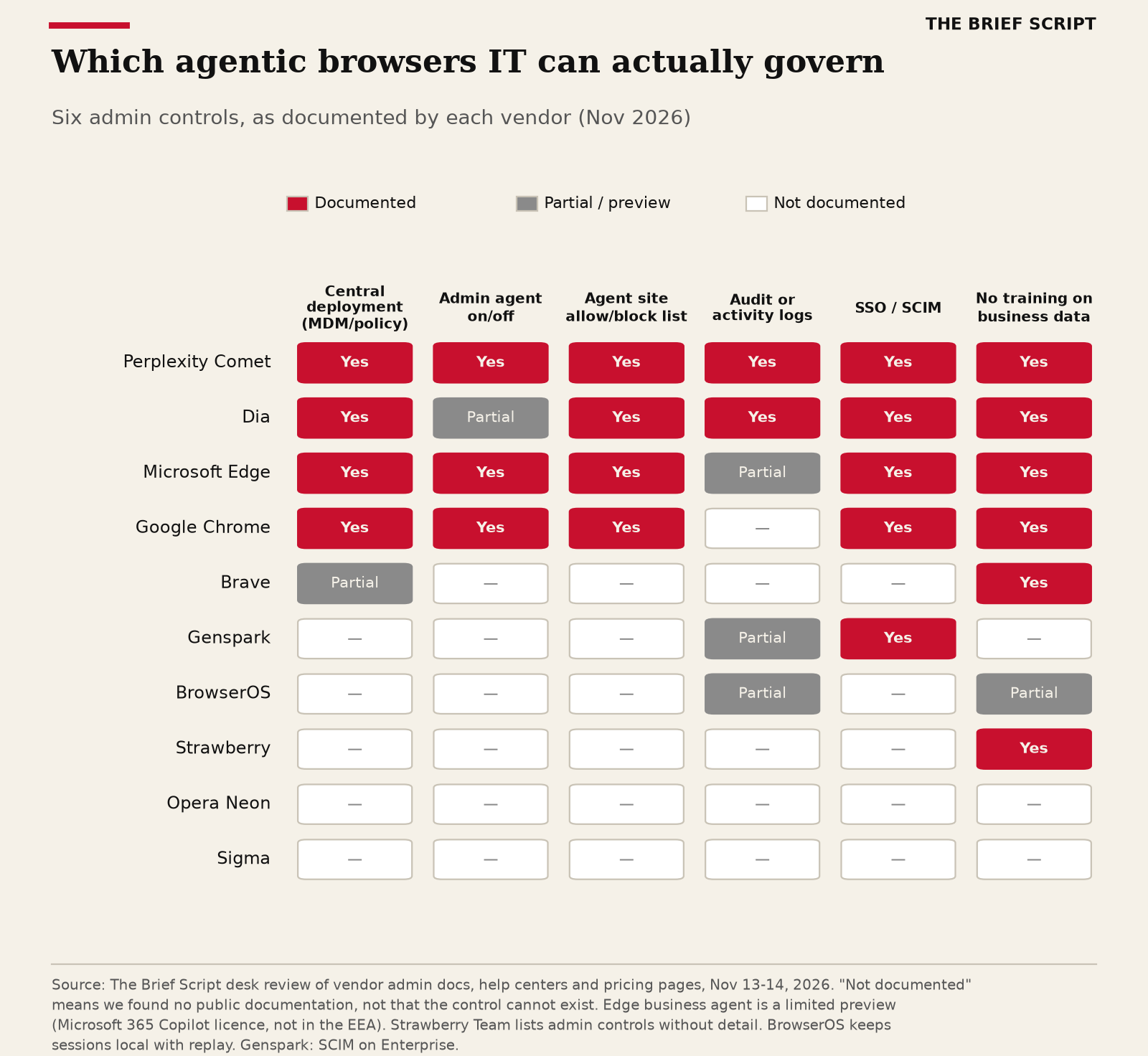
- Require default-deny. The agent should be off until an admin turns it on, and limited to an allow list of sites. Edge, Chrome and Comet Enterprise document this; most startups do not.
- Separate read from act. Comet Enterprise and Dia let you allow answers without actions, or block AI on sensitive domains. Use that for banking, HR, legal and production systems.
- Demand logs of what the agent did, on which site, for whom, and check retention.
- Check the data path. Ask which models process page content, where, and whether business data is used for training. “Stored in the EU” is not the same as “processed in the EU.”
- Pilot low-risk work first: research and comparison before purchases, messages or record changes.
- Write it into policy. Add agentic browsers to your AI acceptable-use rules and governance reviews. Our AI enterprise governance playbook covers the framework.
Methodology
This is a desk comparison, not a hands-on test. On November 13-14, 2026, we read each vendor’s pricing page, help center, admin documentation, changelog or repository, plus original security research from Anthropic, Brave, LayerX, the University of Washington and Gartner. We did not install or benchmark the browsers. Every fact is logged with its source; figures found only in secondary reports are hedged.
We included publicly available browsers with a built-in agent that acts on websites, and excluded extensions (such as Claude for Chrome), developer cloud browsers, retired products (Atlas) and products of unconfirmed status (Fellou). “Admin controls” reflects public documentation; a missing control may exist under contract. No vendor paid for inclusion, and there are no affiliate links.
FAQ
What is an agentic browser?
A browser with a built-in AI agent that can navigate, click, type and fill forms to finish multi-step tasks for you. A browser with only a chat sidebar is an AI browser, not an agentic one.
What is the best AI browser in 2027?
For most people, Perplexity Comet, based on our November 2026 review of vendor documentation. Companies on Microsoft 365 or Google Workspace should start with Edge or Chrome, which they can already manage.
Are agentic browsers safe for work?
Not by default. All are exposed to prompt injection, and researchers have tricked several into leaking credentials. Use one only with the agent off by default, a site allow list and logs.
Is ChatGPT Atlas still available?
No. OpenAI retired Atlas, which was scheduled to stop working on August 9, 2026. Its browser agent now lives in the ChatGPT desktop app, and OpenAI offers a ChatGPT extension for Chrome.
Are agentic browsers free?
Usually the browser is free and the agent costs about $20 a month. Brave’s test feature and open-source BrowserOS are free, though BrowserOS needs a paid or capable local model.
Sources
- OpenAI: ChatGPT release notes (Retiring Atlas): https://help.openai.com/en/articles/6825453-chatgpt-release-notes
- OpenAI: ChatGPT is now a partner for your most ambitious work (July 9, 2026): https://openai.com/index/chatgpt-for-your-most-ambitious-work/
- OpenAI: Continuously hardening ChatGPT Atlas against prompt injection (December 22, 2025): https://openai.com/index/hardening-atlas-against-prompt-injection
- Perplexity: Which Perplexity subscription plan is right for you?: https://www.perplexity.ai/help-center/en/articles/11187416-which-perplexity-subscription-plan-is-right-for-you
- Perplexity: Comet Enterprise is here (March 17, 2026): https://www.perplexity.ai/hub/blog/comet-enterprise-is-here
- Perplexity: Comet for Enterprise (help center): https://www.perplexity.ai/help-center/en/articles/12781449-comet-for-enterprise
- CrowdStrike: CrowdStrike and Perplexity partner on Comet Enterprise (March 11, 2026): https://www.crowdstrike.com/en-us/press-releases/crowdstrike-perplexity-extend-enterprise-grade-security-to-comet-enterprise
- Dia: Plans: https://www.diabrowser.com/plans
- Dia: Dia is built for work: https://www.diabrowser.com/forwork
- Dia: Windows changelog: https://www.diabrowser.com/changelog/windows
- Opera: Subscribe to Opera Neon: https://www.operaneon.com/subscription
- Opera: Your AI agents can use Opera Neon free of charge (August 12, 2026): https://www.operaneon.com/news/your-ai-agents-can-use-opera-neon-free-of-charge
- Microsoft Edge Blog: New updates to Edge across desktop and mobile (May 13, 2026): https://blogs.windows.com/msedgedev/2026/05/13/new-updates-to-edge-across-desktop-and-mobile
- Microsoft: Safe AI at work, Edge for Business: https://explore.microsoft.com/en-us/edge/business/ai-browsing
- Microsoft Learn: AllowBrowsingWithCopilot policy: https://learn.microsoft.com/en-us/deployedge/microsoft-edge-policies/allowbrowsingwithcopilot
- Microsoft: Compare Microsoft 365 plans (Microsoft 365 Premium): https://www.microsoft.com/en-us/microsoft-365/buy/compare-all-microsoft-365-products
- Google: Ask Gemini in Chrome to complete tasks for you with auto browse: https://support.google.com/gemini/answer/16821166?hl=en
- Google: Gemini in Chrome (Chrome Enterprise and Education Help): https://support.google.com/chrome/a/answer/16291696?hl=en
- Google: AI in Chrome: https://www.google.com/chrome/ai-innovations
- Google: Tap into the power of Gemini in Chrome on Android (August 18, 2026): https://blog.google/products-and-platforms/products/chrome/gemini-in-chrome-android-auto-browse/
- Google One: Google AI plans: https://one.google.com/about/google-ai-plans/
- Google Security Blog: Architecting security for agentic capabilities in Chrome: https://security.googleblog.com/2025/12/architecting-security-for-agentic.html
- Brave: AI browsing now available for early testing in Brave: https://brave.com/blog/ai-browsing/
- Brave: Agentic browser security, indirect prompt injection in Perplexity Comet (August 20, 2025): https://brave.com/blog/comet-prompt-injection/
- Genspark: Membership plans: https://www.genspark.ai/helpcenter/membership-plans
- Genspark: AI Browser: https://www.genspark.ai/browser
- BrowserOS: GitHub repository: https://github.com/browseros-ai/BrowserOS
- Sigma: Sigma AI Agent: https://www.sigmabrowser.com/sigma-ai-agent
- Sigma: Pricing: https://www.sigmabrowser.com/plans
- Strawberry: Pricing: https://strawberrybrowser.com/pricing
- Strawberry: Strawberry 1.0 (October 26, 2026): https://strawberrybrowser.com/updates/strawberry-1-0
- Strawberry: Browser agent: https://strawberrybrowser.com/browser-agent
- Gartner: Cybersecurity Must Block AI Browsers for Now (December 1, 2025): https://www.gartner.com/en/documents/7211030
- Anthropic: Mitigating prompt injections in browser use (November 24, 2025): https://www.anthropic.com/research/prompt-injection-defenses
- LayerX: BioShocking AI, gaming the AI browser and escaping its guardrails (June 29, 2026): https://layerxsecurity.com/blog/bioshocking-ai-gaming-the-ai-browser-and-escaping-its-guardrails
- University of Washington: Agentic browsers and the same-origin policy: https://agent-security.cs.washington.edu/agentic_browsers_sop.html
- Arkose Labs: The standalone agentic browser didn’t win (September 11, 2026): https://www.arkoselabs.com/blog/standalone-agentic-browser-didnt-win
- MadRobot: Strawberry AI browser, what it does and where its data goes (November 1, 2026): https://madrobot.blog/2026/11/01/strawberry-ai-browser-100-leads-5-minutes/